I run 72 Zigbee devices through Home Assistant, almost all of them bought on AliExpress and almost all of them cheap. This guide is the reasoning behind those choices — what to check on any "smart" listing before assuming it will integrate, which sensor people waste money on first, and the handful of automations that turned out to be worth building.
None of it is theoretical. Every device mentioned is on our roundup, running in this house.
In this guide
Check the protocol first
Before anything else, look for Zigbee 3.0, Matter, or Wi-Fi with a documented local API stated explicitly in the listing title or specs. Zigbee devices talk to a hub over a low-power mesh network and generally don't need internet access to keep working once paired — this is why they show up so often in Home Assistant setups specifically, ours included. Matter is newer and increasingly well-supported. Plain Wi-Fi devices can work too, but only if the manufacturer actually exposes local control rather than routing everything through their own cloud.
Spotting a cloud-locked device
The warning sign is a listing that only mentions a proprietary app name — "works with [Brand] App" — with no protocol named anywhere in the title, images, or specs. That's usually a device that depends on the manufacturer's own servers to function at all, which means it either won't integrate with Home Assistant cleanly or will require a workaround with no guarantee it keeps working after a firmware update. A listing that's genuinely Home Assistant-friendly usually says so, or at minimum names the actual radio protocol rather than just the app.
What reviews actually tell you
Reviews that specifically name Home Assistant, Zigbee2MQTT, or ZHA are a real positive signal — a reviewer wouldn't invent that level of detail, so it's a genuine data point about compatibility. Generic praise for "the app is easy to use" tells you nothing about local integration and shouldn't be read as confirmation either way; plenty of cloud-locked devices have perfectly pleasant apps.
Categories that tend to work well
Zigbee sensors — smoke detectors, motion sensors, door/window contacts, temperature/humidity — are consistently among the safer categories, since the protocol itself doesn't allow much room for a vendor to lock things down the way a Wi-Fi app-based device can. Smart plugs and lighting are a mixed bag: Zigbee versions tend to integrate cleanly, while Wi-Fi versions vary a lot by brand. When in doubt, a Zigbee listing beats a Wi-Fi one for Home Assistant purposes, all else being equal.
And one that didn't work: ESP32 dev boards
For balance, the category that burned us. We ordered two ESP32 dev boards — the little microcontrollers that run ESPHome, the usual way to add a Bluetooth proxy or a custom sensor to a Home Assistant setup. Wi-Fi didn't work on either one. A board that can't join the network can't talk to Home Assistant at all, so two for two arrived as paperweights.
The honest ending: we never opened a dispute. At a few dollars a board it didn't feel worth the clicks — and that reflex is exactly how bad batches stay profitable, because almost nobody at this price point bothers to claim. If you order these, learn from that: flash one and confirm it joins your Wi-Fi the week it arrives, while buyer protection is still open, rather than when you finally get around to the project.
This doesn't make the category a write-off — ESP32 boards on AliExpress are overwhelmingly third-party clones, and quality varies listing to listing far more than it does for the name-brand Zigbee gear above. It makes it the one category here where "order one spare and test on arrival" is the whole buying advice.
Motion vs presence — the expensive mistake
This is the one I'd warn a beginner about before anything else, because almost everyone buys the wrong one first and then concludes that automated lighting doesn't work.
A PIR motion sensor detects movement — a change in infrared across its field. Sit still at a desk, or lie still in a bath, and once its timeout expires the sensor reports an empty room and the lights go out. That isn't a fault; it's what the sensor measures. A mmWave presence sensor uses 24GHz radar to detect that a body is there, moving or not, and holds the room occupied while you sit perfectly still.
The rule: PIR wherever movement is a safe assumption, mmWave wherever people sit still. I use PIR in the bathrooms — nobody stands motionless in a bathroom — and mmWave in the office and on the porch, where the entire point is detecting someone who isn't moving. PIR is also cheaper and lasts far longer on a battery, so it isn't simply the worse product; it's the wrong product in roughly a third of the places people fit it.
One practical caveat on mmWave: it reads through thin partitions and will cheerfully detect someone in the next room if you aim it carelessly. Tune sensitivity and range once, at install, rather than trusting the defaults to suit your room.
Six automations worth copying
Cheap sensors are only worth owning if something acts on them. These are the ones in my own setup that have earned their place — each a few dollars of hardware doing a job worth considerably more.
1. Rain closes the blinds — gated on presence
When a rain sensor reports sustained rain, Home Assistant closes all the blinds. The important part isn't the trigger, it's the gate: the automation is blocked while the presence sensor on the upstairs porch says someone is out there, because closing a blind on a second-floor porch with a person standing on it locks them outside in the rain. That gate is the difference between an automation you trust and one you switch off after it embarrasses you once. Anything that acts on the physical world needs the same question asked of it — what happens if this fires at the wrong moment?
2. Two rain sensors, not one
Both the blinds and the irrigation depend on knowing whether it's raining, so I run two rain sensors from different sellers into the same logic. A sensor that dies doesn't announce itself — it silently stops reporting rain, and you find out during the first real downpour. Under ten dollars each, redundancy is cheaper than one wet floor. This matters more here than elsewhere: one of my two listings has since vanished from AliExpress entirely, so buying the second at the time turned out to be the only chance I got.
3. Irrigation that skips the rain
A Zigbee water valve runs the drip irrigation on a schedule, and the same rain sensor tells it to skip the cycle. A mechanical timer can't do this — it waters the garden mid-downpour and empties the tank. It's the clearest illustration of why a valve that can be told something beats a timer that can only count.
4. Laundry notifications from a power threshold
The washing machine and the dryer each sit on a power-monitoring plug. When the draw falls below a threshold and stays there, Home Assistant decides the cycle has finished and sends a notification. No appliance integration, no smart washing machine required — just wattage and a little patience. It also happens to prove the plug's metering is responsive, because an automation like this cannot work on readings that lag or jump around.
5. Outdoor lights on lux, never on sunset
Most people trigger outside lights on sunset time. That works until the first heavily overcast afternoon, when the garden is dark at four and the lights are still waiting for a clock — then the seasons shift and it's wrong in the other direction. An illuminance sensor outdoors reports actual brightness, so lights come on at a light level rather than a timestamp. The same reading gates the night lighting so it physically cannot fire during the day, which is the failure that makes people abandon automated lighting altogether.
6. The night light that was already on the wall
Our master bedroom has five backlit touch panels — lights and blinds at the door, one panel per bed side for the room lights plus that side's reading light and blinds, and one at the bathroom door. Five glowing rectangles in a dark bedroom is five too many, so during night hours an automation switches every backlight off. That left the glow as unused hardware, and this is where it gets good: a PIR sensor under the bed, aimed at the floor, turns the backlights back on the instant someone's feet touch the ground — five soft, perfectly placed night lights that cost nothing, because they were already installed as switches. A minute without motion and they go dark again.
The pattern worth stealing isn't the night light, it's one sensor, two jobs, gated by time. The bathroom's motion sensor switches the lights on like any motion sensor — but only during the day. At night the same sensor stops touching the main lights and feeds the night-light automation instead. No mode to remember, no button to press; the hour decides which behaviour is live. (The two sensors doing this are on the finds page.)
And one nobody plans for
I keep a water leak sensor under every sink — five of them. For a long time they did nothing whatsoever. Then the small under-sink hot water unit — the one we use for drinks and washing up — began leaking, and the sensor beneath it caught it: we were notified while it was still a leak rather than after it had become a flood. That's the whole argument for the category. They're the cheapest insurance in the house, and they're supposed to be boring.
Start with the coordinator
Building from scratch, spend your attention here rather than on sensors. Individual devices are commodities and largely interchangeable; the coordinator decides whether a large mesh stays stable or starts dropping devices and demanding re-pairs at midnight.
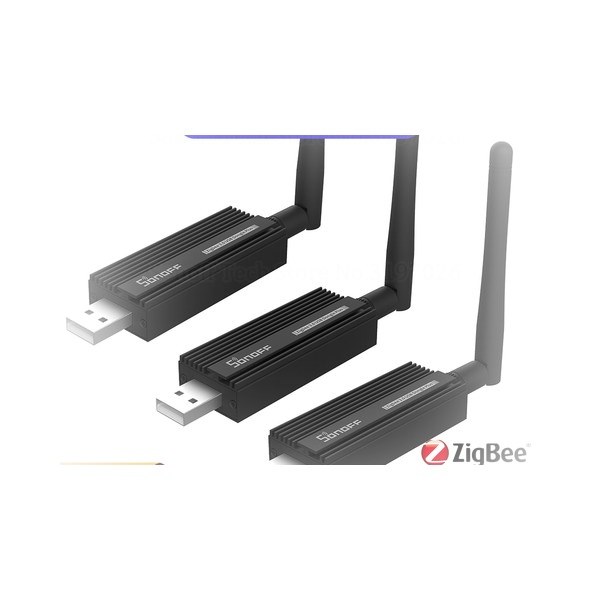
Mine holds 72 devices without complaint. Get one with an external antenna, pre-flashed for ZHA or Zigbee2MQTT so Home Assistant recognises it on plug-in, and run it on a USB extension cable away from the machine — USB 3.0 ports emit interference right in the 2.4GHz band Zigbee uses, and "my mesh is flaky" is very often a dongle pushed straight into a server. Everything else on this page pairs to that one device. Get it right once and the rest of the category becomes cheap.
The one we run is the SONOFF ZBDongle-P — external antenna, pre-flashed, recognised by both ZHA and Zigbee2MQTT on plug-in. It is the cheapest part of a large mesh and the only one worth being fussy about.
On pricing: price checked 1 October 2026. AliExpress prices move constantly — confirm on the listing before buying.
Frequently asked questions
Should I buy a motion sensor or a presence sensor?
Both, in different rooms. A PIR motion sensor detects movement and will decide a room is empty if you sit still, so it suits places where people are always moving — hallways, bathrooms, stairs. A mmWave presence sensor detects that a body is present whether or not it's moving, which is what you want in an office, a living room, or anywhere someone sits. PIR is cheaper and lasts much longer on a battery, so it isn't the worse device — it's the wrong device in about a third of the places people fit it.
What should I buy first for a Home Assistant setup?
A good Zigbee coordinator, before any sensors. The sensors are commodities and largely interchangeable; the coordinator decides whether a large mesh stays stable. Get one with an external antenna, pre-flashed for ZHA or Zigbee2MQTT, and run it on a USB extension away from the machine — USB 3.0 ports interfere with the 2.4GHz band Zigbee uses, and that alone explains a lot of "unreliable" meshes.
How do I know if an AliExpress device works with Home Assistant?
Look for Zigbee 3.0, Matter, or Wi-Fi with a locally-controllable API explicitly stated in the listing title or specs. If a listing only mentions a proprietary app name with no protocol mentioned at all, treat that as a sign it's likely cloud-locked rather than assuming it'll integrate.
What's the difference between Zigbee and Wi-Fi smart devices for Home Assistant?
Zigbee devices talk to a central hub over a low-power mesh network and typically don't need cloud access to function once paired, which is why they're generally preferred for Home Assistant setups. Wi-Fi devices connect directly to your network, which is simpler with no separate hub required, but many Wi-Fi "smart" devices are built to depend on a manufacturer's cloud service, which Zigbee devices are not.
Can I trust reviews to tell me if a device works with Home Assistant?
Partially. Reviews that specifically mention Home Assistant, Zigbee2MQTT, or ZHA integration by name are a strong positive signal, since a reviewer wouldn't invent that detail. Generic reviews praising an app experience tell you nothing about local compatibility and shouldn't be read as confirmation either way.
Spotted a wrong price, a dead listing, or a claim that doesn't hold up? Tell me and I'll fix it — reader corrections have already made these pages better more than once.


